
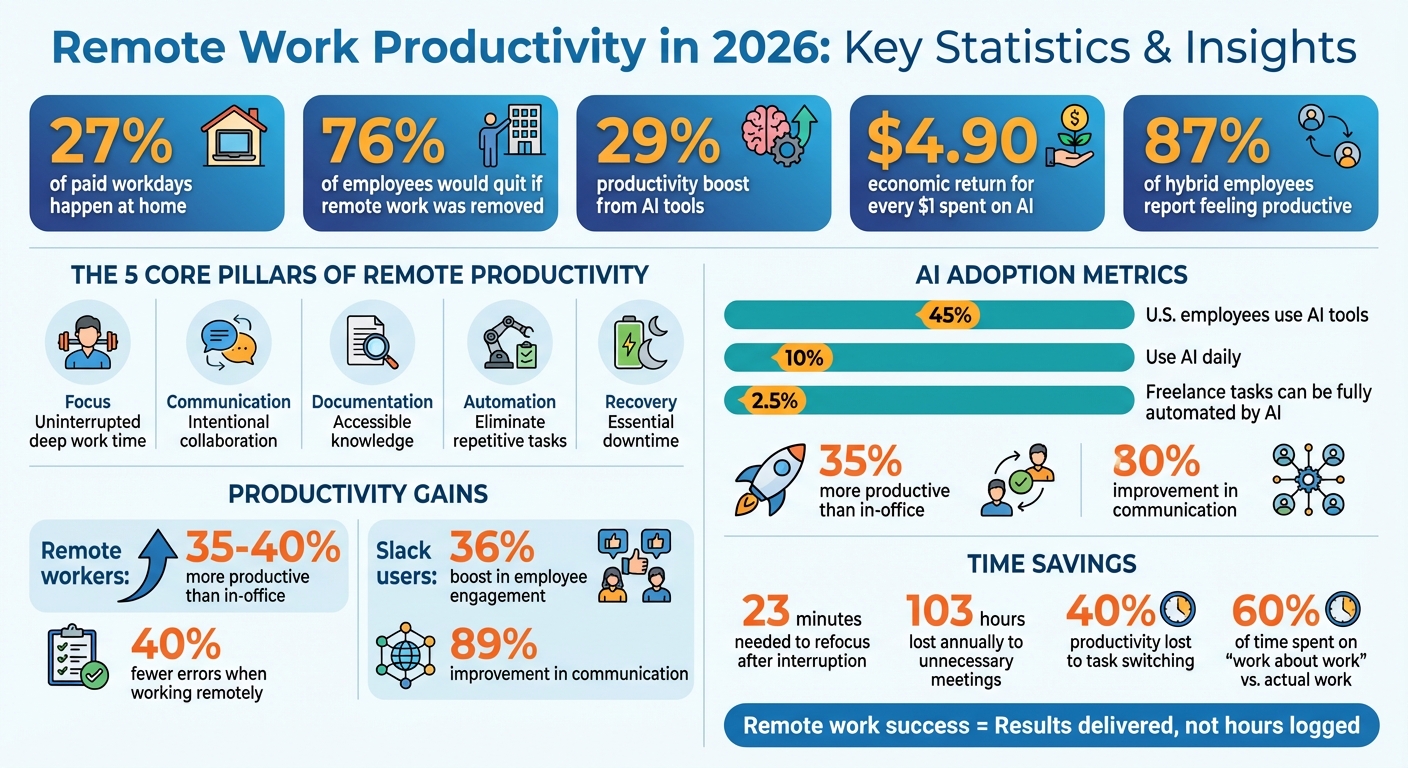
Remote work in 2026 is now the norm, with 27% of paid workdays happening at home. Success isn’t just about working from anywhere – it’s about working smarter. Here’s what you need to know:
- Key Stats: 76% of employees would quit if remote work was removed, and AI tools boost productivity by 29%.
- Core Focus Areas: Productivity depends on focus, communication, documentation, automation, and recovery.
- AI’s Role: AI tools handle repetitive tasks, improve communication, and help teams manage workflows efficiently.
- Global Challenges: Remote workers must navigate time zones, compliance, and digital nomad taxes, especially for cross-border operations.
- Top Tools: Platforms like Slack, Asana, and Motion simplify collaboration, task management, and scheduling.
- Planning Tips: Use time blocking, task batching, and energy-based scheduling to maximize output.
- Compliance for U.S. Workers: Tax strategies like the Foreign Earned Income Exclusion (FEIE) can help manage dual tax obligations.
Remote work today is about delivering results, not hours logged. With the right tools, workflows, and planning, professionals can thrive while maintaining balance.
Remote Work Productivity Basics in 2026
Core Principles of Remote Productivity
Remote work productivity in 2026 revolves around five key pillars: focus, communication, documentation, automation, and recovery. These principles separate highly effective remote professionals from those who struggle to keep distractions at bay.
Focus is all about safeguarding uninterrupted time for deep work, free from the constant interruptions of notifications and meetings. Communication involves being intentional about when to collaborate in real-time versus relying on asynchronous updates. Documentation ensures that decisions, processes, and valuable knowledge are accessible and not buried in chat threads or dependent on memory. Automation takes care of repetitive tasks, freeing up time for more strategic efforts. Finally, recovery reminds us that real productivity requires genuine downtime – not just switching from one work task to another.
In today’s remote work landscape, productivity is judged by results, not hours logged or online presence. This shift is significant because while 87% of hybrid employees report feeling productive at work, one in four business leaders still rely on outdated visibility-based metrics. Teams that embrace these principles tend to achieve better retention rates and higher output compared to those stuck in "productivity theater."
These foundational ideas have paved the way for leveraging AI and automation to take efficiency to new heights.
How AI and Automation Changed Remote Work
AI has redefined remote work, shifting the focus from simply completing tasks to orchestrating strategies. By 2026, remote professionals are delegating routine, repetitive tasks to AI tools, allowing them to concentrate on creative problem-solving and strategic decision-making. This transformation is tangible: employees using AI tools have reported a 29% boost in productivity, and every dollar spent on AI generates an estimated $4.90 in economic returns.
One of the most noticeable changes is how AI has streamlined communication. Tools like Otter.ai and Fathom filter out unnecessary messages, direct essential information to the right people, and create concise meeting summaries. This helps reduce digital fatigue and keeps teams aligned without the need for constant meetings. By late 2025, about 45% of U.S. employees had incorporated AI into their work routines, though only 10% used it daily, indicating that widespread adoption is still in its early stages.
Real-world examples illustrate these benefits. For instance, Convictional, a remote-first company led by CEO Roger Kirkness, adopted a four-day workweek in January 2026 with the help of AI tools like Anthropic‘s Claude Code. These tools automated coding and project management tasks, enabling the team to maintain their output while reducing burnout. Product engineer Prentice Bjerkeseth noted the shift significantly improved work-life balance. Similarly, Peak PEO, under CEO Alex Voakes, used AI to manage invoicing and analyze sales data. After implementing these changes, job applications for open roles skyrocketed from an average of two to 350 per opening.
"AI has such a potential to have so much labor savings, you’ll see firms shift to a four day week in an evolutionary way." – Juliet Schor, Economist, Boston College
However, AI isn’t a magic solution. A 2026 study found that autonomous AI systems could fully complete only 2.5% of freelance tasks without human input. This underscores that AI enhances, rather than replaces, human capabilities. It excels at automating repetitive tasks and handling data-heavy work, but humans are still crucial for providing context, nuance, and emotional intelligence.
These advancements are reshaping remote work, setting the stage for professionals to adapt and thrive in this evolving environment.
Working Remotely as a U.S.-Based Professional
For U.S.-based professionals, adapting to these changes means tackling unique challenges to maximize remote productivity. One of the biggest shifts is the growing importance of time zone alignment over physical location. Employers now prioritize availability during key hours over where you’re working from. Being out of sync with your team or clients for 8–10 hours a day is increasingly seen as unsustainable for most roles.
If you’re working with U.S.-based clients, staying aligned with U.S. time zones and holidays is often non-negotiable. This typically involves setting "core hours" – 2–3 hours of overlap with your team or clients for real-time communication. Outside of these windows, ensure your messages are clear and include all necessary details, like resources and screenshots, so colleagues can move forward without waiting for your response.
To maintain boundaries, use precise status indicators and set clear "away" messages. Wrapping up your day with a 10–15 minute review and creating a priority list for the next day can help you close out effectively.
For location-independent professionals working across borders, compliance and business structure are critical. Organizations like Global Wealth Protection specialize in tax strategies and legal setups tailored to U.S. professionals working internationally. They can help ensure your remote work arrangement is both efficient and compliant, no matter where you’re based.
sbb-itb-39d39a6
Remote Work Tools for 2026
Communication and Collaboration Tools
In 2026, communication tools go far beyond simple messaging – they now manage entire meeting workflows. From AI-generated agendas to scheduling across time zones, real-time transcription, and automated summaries, these tools are reclaiming hours of lost productivity by cutting down on unproductive meetings.
AI companions play a key role, pulling action items straight from transcripts and chats. Tools like Zoom Clips and Loom deliver short-form video updates that fit seamlessly into deep-focus work schedules. For example, Slack users have reported a 36% boost in employee engagement and an 89% improvement in communication. Its Workflow Builder has also saved users 28% more time. Platforms like Notion and Slack now feature natural language search, making it easy to query internal wikis and past conversations.
"Work is complicated. Your collaboration tools shouldn’t be." – Zoom Workplace
AI-powered, all-in-one platforms are also helping teams cut costs by reducing app-switching. These streamlined solutions can save up to $750 per user annually by consolidating subscriptions.
As communication tools become more efficient, remote teams are increasingly turning to AI-driven project management systems to automate and prioritize tasks.
Project and Task Management Tools
By 2026, project management has shifted gears. Instead of teams manually updating tasks, platforms now use AI to proactively handle task capture, prioritization, and scheduling. Tools like ClickUp, Motion, Asana, and Notion are leading this charge, reducing the administrative load and freeing up time for meaningful work.
Each platform brings something unique to the table. ClickUp uses natural language processing to summarize tasks, while Motion dynamically adjusts your calendar based on priorities. Asana aligns tasks with company objectives through its work graph feature, and Notion can create tasks directly from meeting notes or brainstorming sessions. Seamless integration with communication platforms like Slack allows teams to manage tasks without interrupting their workflow.
These tools also suggest task updates for human approval, minimizing manual input and catching potential errors. Choosing the right tool often depends on your team’s needs. For example, Motion works well for smaller teams focused on individual prioritization, while Asana is better for mid-sized organizations looking to align tasks with broader goals. Running a short pilot can help gauge how effective these tools are before committing to a full rollout.
To complement these platforms, modern time tracking and focus tools are helping teams optimize productivity and maintain uninterrupted work sessions.
Time Tracking and Focus Tools
Time tracking tools like Clockify, Toggl Track, and Harvest have become more intuitive, recording only active work through idle detection. Focus apps have also stepped up, enforcing structured work sessions – such as the Pomodoro Technique – and automatically securing calendar blocks for uninterrupted work.
AI-powered scheduling tools like Reclaim, Motion, and Clockwise take this further by coordinating calendars, managing out-of-office statuses, and ensuring focus time is preserved.
Security remains a priority for remote workers. Secure browsers, password managers, and VPNs protect sensitive data, especially on public networks. For added peace of mind, Backblaze offers unlimited online backups for $6 per month per computer, giving remote employees reliable IT support in a pinch.
A growing trend is the rise of AI orchestration layers, which aim to integrate tools, data, and AI systems more effectively. As these systems evolve, expect time tracking and focus tools to sync seamlessly with your actual work patterns. This is especially important as 78% of enterprises continue to face challenges integrating AI with their existing tech stacks.
Productivity Techniques and Workflows for Remote Work
Planning and Scheduling Systems
Time blocking remains a cornerstone of remote work efficiency in 2026. By dividing your day into specific blocks for particular tasks, this method minimizes decision fatigue and secures uninterrupted focus time. Cal Newport, author of Deep Work, highlights its power: "A 40 hour time-blocked work week, I estimate, produces the same amount of output as a 60+ hour work week pursued without structure".
Combining techniques can amplify results. Task batching, for instance, groups similar activities – like email management or administrative tasks – into single blocks, cutting down on context switching, which can sap up to 40% of productivity. Day theming takes this a step further by assigning each day a dedicated purpose, such as "Meetings Monday" or "Deep Work Tuesday". Mike Vardy, Founder of Productivityist, explains: "Knowing what the day ‘means’ to me allows me to get the things I need and want to accomplish without seeing unspecified tasks on a to-do list".
Energy-based planning is another game-changer for remote professionals. By aligning tasks with your natural energy highs and lows, you can tackle demanding tasks when you’re most alert and leave lower-priority work for slower periods. Protecting these focus blocks is crucial, especially since it takes an average of 23 minutes to refocus after an interruption.
AI-powered scheduling tools like Motion ($12–$19/month) are making these methods easier to implement. These tools automate daily schedules, prioritize tasks, and adjust plans dynamically when priorities shift. Think of them as "Tetris" for your calendar, slotting tasks into the best available times based on deadlines and importance.
One smart tip: follow the 75% Rule. Schedule only 75% of your day, leaving the remaining 25% as a buffer for unexpected tasks or technical hiccups. Wrapping up your day with a shutdown ritual – reviewing accomplishments, clearing your workspace, and setting your top priority for tomorrow – helps maintain a clear boundary between work and personal life.
Asynchronous Communication and Documentation
While structured planning protects focus, effective asynchronous communication ensures smooth collaboration without constant interruptions.
Async-first communication allows teams across time zones to work on their schedules, reducing the need for late-night or early-morning meetings. But it’s more than just timing; it’s about thoughtfulness over speed. Written communication in asynchronous formats often leads to more thoughtful contributions compared to the rapid pace of live discussions. As Edward Brown notes, "Interruptions diminish high-quality execution by breaking momentum, thus resulting in the need for distressful do-overs".
Creating a single source of truth with tools like Notion or Google Docs is essential. Documenting project details, responsibilities, and decisions ensures everyone stays aligned, even when teammates are unavailable. Recording virtual meetings, stand-ups, and training sessions also helps team members in different time zones stay informed.
To avoid constant distractions, batch communication into 2–3 dedicated windows per day instead of monitoring Slack or email all day. When sending async messages, include all necessary context – deadlines, links to resources, and screenshots – to minimize back-and-forth. Use status updates to signal availability and focus times, and avoid sending non-urgent messages outside your colleagues’ working hours.
Using Metrics to Improve Productivity
Tracking performance is key to refining your remote work routines. Instead of focusing on hours worked, modern productivity metrics emphasize the results and value delivered.
Remote workers are often 35–40% more productive than their in-office counterparts and make 40% fewer errors, but this only holds true when outcomes, not activity, are measured. A good starting point is to track deep work hours – the time spent in uninterrupted focus. Aim for 3–4 hours of deep work daily. Currently, knowledge workers spend 60% of their time coordinating or managing "work about work" rather than producing meaningful results. Reducing this percentage while boosting task completion rates to 80–90% should be a priority.
Measuring time per task accuracy can also pinpoint workflow inefficiencies. Compare the actual time spent on tasks versus your estimates. If you’re staying within 20% of your projected time, your planning is on track. Use a 30-minute weekly review session to analyze these metrics, identify your peak productivity hours, and figure out which tasks consistently take longer than expected.
To keep your day flexible, leave about 20% of your schedule open for unexpected disruptions. Regularly audit recurring meetings to eliminate those without clear agendas, as unnecessary meetings cost employees 103 hours annually. And since constant task switching can drain up to 40% of productivity, group similar tasks together and align your work with your natural energy rhythms.
Remote Work Productivity and Global Lifestyle Planning
Business Structures for Location-Independent Work
Being productive while working remotely isn’t just about managing your time or using the right tools – it also depends on having the right business structure in place. For professionals earning income across borders, choosing the right setup is key to protecting your assets and managing taxes effectively.
Take a U.S. LLC (Limited Liability Company), for example. It separates your personal assets from your business liabilities, so if your business faces legal issues, your personal assets are usually protected. Plus, it offers pass-through taxation, meaning the business income is taxed only once at the individual level, avoiding double taxation. Filing fees vary widely, from $35 to $500 depending on the state, with California imposing an $800 annual tax regardless of business activity.
For those working internationally, forming an offshore company can help manage global income streams while offering better privacy and asset protection. Anguilla, for instance, is a jurisdiction known for its favorable regulations. Companies like Global Wealth Protection assist remote professionals in setting up private U.S. LLCs and offshore entities, ensuring tax compliance and optimization.
When setting up an LLC, hiring a registered agent is a must. This person or service handles legal notifications and helps keep your personal address off public records.
Ultimately, a well-thought-out business structure lays the groundwork for compliant and efficient global operations.
Working Across Borders: Productivity and Compliance
Once your business structure is in place, staying compliant with tax residency and legal requirements across borders is just as important. Compliance not only keeps you on the right side of the law but also reduces the stress of navigating regulatory uncertainties, letting you focus on your work.
Tax residency usually depends on where you live and work. However, U.S. citizens are taxed on their worldwide income no matter where they reside. As the IRS explains: "If you are a U.S. citizen or resident alien, your worldwide income is generally subject to U.S. income tax, regardless of where you are living".
Remote workers can use the Foreign Earned Income Exclusion (FEIE) to exclude up to $126,500 of foreign income from U.S. taxes, provided they meet the 330-day Physical Presence Test within a 12-month period. Many countries consider you a tax resident after 183 days of physical presence, which could lead to dual tax obligations. To simplify this, you might consider working with an Employer of Record (EOR), which handles local tax withholding and ensures compliance with labor laws.
U.S. professionals working abroad should also file IRS Form 673 to claim exemption from U.S. income tax withholding on income covered by the FEIE. Additionally, if your foreign financial accounts exceed certain thresholds, you’ll need to file FinCEN Form 114 (FBAR) and/or IRS Form 8938 to report those assets.
For added peace of mind, enroll in the Smart Traveler Enrollment Program (STEP). This program provides security updates and ensures the U.S. embassy can assist you during emergencies. By combining these compliance measures with productivity strategies, remote professionals can achieve long-term success while working across borders.
Conclusion
By 2026, thriving in a remote work environment will depend on blending smart automation with thoughtful scheduling. As companies increasingly prioritize outcomes over hours worked, your productivity will be judged by results, not time spent at the desk. Using AI-driven tools to handle repetitive tasks, adopting time management methods like the 3-2-1 Rule, and excelling in asynchronous communication can help you get more done while preserving work-life balance.
The stakes are high for businesses, too. With 76% of employees stating they’d quit if remote work were no longer an option, companies that resist adapting may lose valuable talent. High productivity paired with reduced costs highlights the importance of embracing effective remote work strategies.
For professionals working from anywhere, combining productivity techniques with solid business frameworks is crucial. Services such as Global Wealth Protection assist remote workers in setting up compliant structures that support flexible lifestyles. These frameworks not only safeguard your assets but also create a foundation for the streamlined workflows essential to remote success.
Ultimately, excelling in remote work comes down to three key components: the right tools and workflows, clear boundaries to prevent burnout, and strategic planning for global operations. Master these pillars, and you’ll be well-equipped to thrive in a remote-first world.
FAQs
How do AI tools improve productivity for remote workers?
AI tools are transforming the way remote work gets done by taking care of repetitive tasks and simplifying workflows. With intelligent assistants, remote workers can leave behind the hassle of scheduling meetings, sorting through endless emails, or generating reports. Instead, they can focus their energy on projects that truly matter. For example, Microsoft Copilot can draft documents, summarize conversations, and even suggest actionable next steps. Meanwhile, Slack’s AI features make it easy to locate messages or manage discussions seamlessly, even across different time zones.
Platforms like Zapier take automation a step further by letting users create custom workflows – no coding required. These workflows can connect apps to handle tasks like updating project boards or sharing daily summaries automatically. The result? Teams save time, minimize errors, and collaborate more effectively, no matter where they’re located.
For professionals who work from anywhere, combining these productivity tools with solutions like private U.S. LLC formation or offshore asset protection ensures business operations stay secure while running efficiently. Together, these tools and services empower remote workers to operate smarter and with greater peace of mind.
How can I maintain a healthy work-life balance while working remotely?
To keep a healthy balance between work and personal life while working remotely, start by setting firm boundaries. Designate a specific area in your home for work, and stick to consistent start and stop times for your workday. A morning ritual – like taking a short walk, enjoying a cup of coffee, or doing some light stretching – can ease you into "work mode." At the end of the day, small habits like shutting down your computer or jotting down tomorrow’s priorities can signal that it’s time to wind down.
Stay on track by using tools like daily to-do lists or time-blocking to tackle your key tasks. Don’t forget to schedule regular breaks for movement, fresh air, or a snack to recharge. When it’s personal time, make activities like exercising, pursuing hobbies, or spending time with family a priority, and treat them as commitments you can’t skip. Be upfront with your teammates about your availability and set clear expectations for response times to ensure work doesn’t spill over into your personal hours. These simple steps can help you stay productive while safeguarding your well-being.
How do U.S. taxes apply to remote workers living abroad?
U.S. tax laws operate on a citizenship-based system, meaning American remote workers must report and pay taxes on their worldwide income, regardless of where they live. Even if you spend the entire year outside the U.S., you’re still required to file a federal tax return if your income surpasses the standard deduction (set at approximately $13,850 for single filers in 2026). Depending on your situation, you might also need to file additional forms for foreign assets, bank accounts, or self-employment income.
To ease the burden of double taxation, the IRS provides relief options. The Foreign Earned Income Exclusion (FEIE) lets you exclude up to $120,000 of qualifying income, while the Foreign Tax Credit offers a dollar-for-dollar credit for taxes paid to foreign governments. If you’re incurring housing expenses abroad, you might also qualify for the Foreign Housing Exclusion.
State tax obligations can complicate matters further. If you maintain connections like a driver’s license, voter registration, or a permanent address in a specific state, you could still owe state taxes. Staying compliant involves careful planning – track your time abroad, keep records of foreign taxes paid, and stay on top of federal and state filing deadlines. With the right preparation, you can reduce your overall tax burden while enjoying the perks of working remotely overseas.
